> For the complete documentation index, see [llms.txt](https://guides.stellaraio.com/stellar/llms.txt). Markdown versions of documentation pages are available by appending `.md` to page URLs; this page is available as [Markdown](https://guides.stellaraio.com/stellar/installation-uninstallation/how-do-i-update-stellar-pc-and-mac.md).
# Update Stellar — Windows and Mac
Update Stellar AIO 4.0 on Windows or Mac, understand backend updates, and find the correct manual download.
Keep Stellar AIO 4.0 up to date to receive fixes and improvements. You can update from inside Stellar, or download the latest installer from [#change-log](https://discord.com/channels/1417577339671285984/1417581765295472830) if the built-in updater has a problem.
### Before you update
* Read the latest release notes in **#change-log** for any special instructions.
* Finish or stop your tasks before installing an update or restarting Stellar. Restarting interrupts running tasks, including tasks you control through the Mobile Companion App.
* Keep your computer connected to the internet while the update downloads and installs.
### Update from inside Stellar
Stellar displays a popup when an update is available. These steps apply to the Windows and Mac desktop app.
1. Open Stellar. If you dismissed the popup, use **Update Available** at the bottom of the sidebar to view the available update.
2. Review the version and **What’s new** notes. If the window offers a download button, such as **Download 1 update**, click it and let the download finish.
3. When prompted, choose **Install & Restart** to apply the update. Choose **Later** if you are not ready to restart yet.
4. Let the update finish and reopen Stellar if needed. Check the version displayed beside the Stellar AIO name at the top-left of the app.
5. Check your task setup, then start the tasks you want to run again.
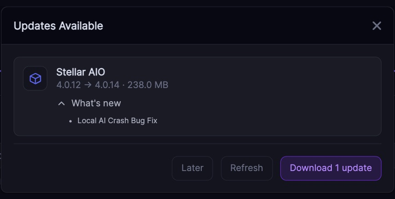 **Later postpones the update.** Return to it when you can safely restart. The version numbers shown in screenshots are examples; use the newest applicable release in #change-log.
### Backend updates: when the post says “Restart bot to update”
Some #change-log posts are labeled **New Backend Update Available**. The backend is the part of Stellar that runs its automation. These posts may show a different version number from the desktop app release.
1. Read the post’s instructions.
2. If it says **Restart bot to update**, stop your tasks and fully quit Stellar, then open it again. Minimizing the window is not a restart.
3. Allow Stellar to finish starting before resuming your tasks.
You do not need to look for a Windows or Mac download link in a backend-only post that instructs you to restart. For a desktop app update, use the in-app updater or the installer links in its release post.
### Manually download the latest update
Use this option if the built-in update does not complete or the release notes tell you to download manually.
1. Open [#change-log](https://discord.com/channels/1417577339671285984/1417581765295472830) in the Stellar Discord.
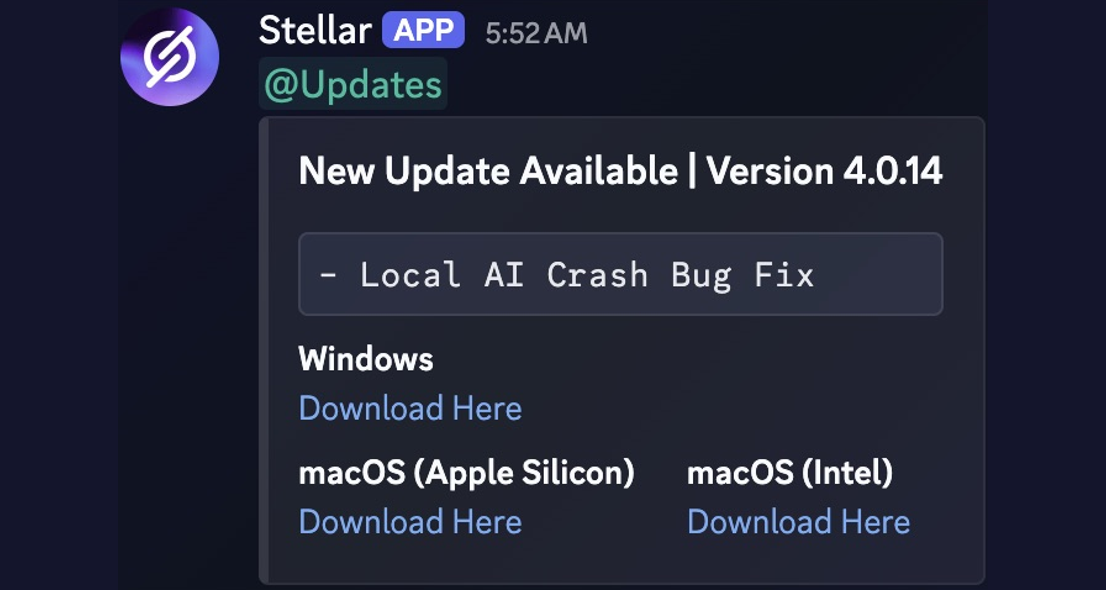
2. Find the latest **New Update Available** desktop release post with download links. A newer backend-only post may appear below it.
3. Choose **Windows**, **macOS (Apple Silicon)** or **macOS (Intel)**, as appropriate for your computer.
4. Stop your tasks and close Stellar before running the downloaded installer. Follow the installer’s steps for your operating system.
5. Open Stellar after installation and check its displayed version against the desktop release you downloaded.
**Later postpones the update.** Return to it when you can safely restart. The version numbers shown in screenshots are examples; use the newest applicable release in #change-log.
### Backend updates: when the post says “Restart bot to update”
Some #change-log posts are labeled **New Backend Update Available**. The backend is the part of Stellar that runs its automation. These posts may show a different version number from the desktop app release.
1. Read the post’s instructions.
2. If it says **Restart bot to update**, stop your tasks and fully quit Stellar, then open it again. Minimizing the window is not a restart.
3. Allow Stellar to finish starting before resuming your tasks.
You do not need to look for a Windows or Mac download link in a backend-only post that instructs you to restart. For a desktop app update, use the in-app updater or the installer links in its release post.
### Manually download the latest update
Use this option if the built-in update does not complete or the release notes tell you to download manually.
1. Open [#change-log](https://discord.com/channels/1417577339671285984/1417581765295472830) in the Stellar Discord.
2. Find the latest **New Update Available** desktop release post with download links. A newer backend-only post may appear below it.
3. Choose **Windows**, **macOS (Apple Silicon)** or **macOS (Intel)**, as appropriate for your computer.
4. Stop your tasks and close Stellar before running the downloaded installer. Follow the installer’s steps for your operating system.
5. Open Stellar after installation and check its displayed version against the desktop release you downloaded.
 For installation help, see [How do I download StellarAIO? (Windows and Mac)](https://guides.stellaraio.com/stellar/installation-uninstallation/how-do-i-download-stellaraio-windows-and-mac). Do not delete your saved Stellar data as a routine update step. If you are unsure how to proceed, ask support before uninstalling anything.
### Which Mac download should I choose?
On your Mac, open the **Apple menu → About This Mac** and look for the chip or processor information.
* **Apple chip, such as an M-series chip:** Choose **macOS (Apple Silicon)**. The download may also be labeled **arm64**.
* **Intel processor:** Choose **macOS (Intel)**. The download may also be labeled **x64**.
Use the installer for the computer running Stellar. If you run Stellar on a Windows server and connect to it from a Mac, the server needs the Windows installer.
### Can’t see #change-log?
Make sure you are signed in to the Discord account linked to your Stellar membership. If you own a key, follow [How Do I Access and Manage My Account?](https://guides.stellaraio.com/stellar/how-do-i-access-and-manage-my-account) to check your membership and claim Discord access.
If you are renting Stellar and do not have access to the channel, ask the person you are renting from for the latest official download links.
### If the update still does not work
Open a **Support Ticket** in [#open-ticket](https://discord.com/channels/1417577339671285984/1417909247756468396). Include your operating system, current Stellar version, the version you tried to install, the step that failed and the exact error message. For Mac, include whether it uses Apple Silicon or Intel.
A screenshot of the update window or error can help. Hide license keys, account details and other private information before sharing it. Use an **Admin Ticket** if the issue is missing membership or Discord access.
---
# Agent Instructions
This documentation is published with GitBook. GitBook is the documentation platform designed so that both humans and AI agents can read, navigate, and reason over technical content effectively. Learn more at gitbook.com.
## Querying This Documentation
If you need additional information that is not directly available in this page, you can query the documentation by asking a question.
Perform an HTTP GET request on the following URL with the `ask` and `goal` query parameters:
```
GET https://guides.stellaraio.com/stellar/installation-uninstallation/how-do-i-update-stellar-pc-and-mac.md?ask=&goal=
```
`ask` is the immediate question: it should be specific, self-contained, and written in natural language.
`goal` is what the user is ultimately trying to achieve, the reason they need the answer. Sharing it helps GitBook give you a better, more relevant answer. A goal is most helpful when it describes the outcome the user wants rather than restating the question. For example, with `ask=how do I create an API token`, a goal like `automate deployments from our CI pipeline` lets GitBook tailor the answer to that use case.
The response will contain a direct answer to the question and relevant excerpts and sources from the documentation.
Use this mechanism when the answer is not explicitly present in the current page, you need clarification or additional context, or you want to retrieve related documentation sections.
For installation help, see [How do I download StellarAIO? (Windows and Mac)](https://guides.stellaraio.com/stellar/installation-uninstallation/how-do-i-download-stellaraio-windows-and-mac). Do not delete your saved Stellar data as a routine update step. If you are unsure how to proceed, ask support before uninstalling anything.
### Which Mac download should I choose?
On your Mac, open the **Apple menu → About This Mac** and look for the chip or processor information.
* **Apple chip, such as an M-series chip:** Choose **macOS (Apple Silicon)**. The download may also be labeled **arm64**.
* **Intel processor:** Choose **macOS (Intel)**. The download may also be labeled **x64**.
Use the installer for the computer running Stellar. If you run Stellar on a Windows server and connect to it from a Mac, the server needs the Windows installer.
### Can’t see #change-log?
Make sure you are signed in to the Discord account linked to your Stellar membership. If you own a key, follow [How Do I Access and Manage My Account?](https://guides.stellaraio.com/stellar/how-do-i-access-and-manage-my-account) to check your membership and claim Discord access.
If you are renting Stellar and do not have access to the channel, ask the person you are renting from for the latest official download links.
### If the update still does not work
Open a **Support Ticket** in [#open-ticket](https://discord.com/channels/1417577339671285984/1417909247756468396). Include your operating system, current Stellar version, the version you tried to install, the step that failed and the exact error message. For Mac, include whether it uses Apple Silicon or Intel.
A screenshot of the update window or error can help. Hide license keys, account details and other private information before sharing it. Use an **Admin Ticket** if the issue is missing membership or Discord access.
---
# Agent Instructions
This documentation is published with GitBook. GitBook is the documentation platform designed so that both humans and AI agents can read, navigate, and reason over technical content effectively. Learn more at gitbook.com.
## Querying This Documentation
If you need additional information that is not directly available in this page, you can query the documentation by asking a question.
Perform an HTTP GET request on the following URL with the `ask` and `goal` query parameters:
```
GET https://guides.stellaraio.com/stellar/installation-uninstallation/how-do-i-update-stellar-pc-and-mac.md?ask=&goal=
```
`ask` is the immediate question: it should be specific, self-contained, and written in natural language.
`goal` is what the user is ultimately trying to achieve, the reason they need the answer. Sharing it helps GitBook give you a better, more relevant answer. A goal is most helpful when it describes the outcome the user wants rather than restating the question. For example, with `ask=how do I create an API token`, a goal like `automate deployments from our CI pipeline` lets GitBook tailor the answer to that use case.
The response will contain a direct answer to the question and relevant excerpts and sources from the documentation.
Use this mechanism when the answer is not explicitly present in the current page, you need clarification or additional context, or you want to retrieve related documentation sections.